Friday, November 12, 2021

10 Tips for Success in WordPress


Ways to get success in WordPress

1. Unique post

If you have created any type of blog site then you should always post high quality. And you have to put a post on the site that is at least 98% unique and if you can, then try to keep 100% unique post. And if you create a news site, then always keep 100% accurate and true news site. And in no case can the news be copied. Must post at least 95% unique 6 There are many websites to know how unique the post is. You can search for them on YouTube or Google.

2. Copy post

There are many who post copies on the site. I am telling them to give up the hope of Adsense. Because Google never supports copy post. The post must be written in its own language. If you want, you can get the idea of ​​the post from Google, YouTube, etc., but in no way can be given exactly that post site. There are many people who change the word after copying the post and post it on another site. This is called re-writing. And Google does not support this issue.

3. Add a photo downloaded from Google to a post or add it as a thumbnail

Downloading an image directly from Google and posting it on your own site is the biggest foolishness. Because, Google has determined this thing as copyright. But you are giving a picture in the post which you will not find anywhere except Google or search engine. Take for example: pictures of flowers, pictures of fruits, etc.

In that case you can download pictures from Google if you want. However, downloaded images cannot be posted directly. Image needs to be lightly edited. For example, if you want, you can add the name or logo of your site in one corner of the image or in one place. Then you can put it in your post. In that case Google will not capture the copy image.

4. Domain and hosting

You need to add any paid domain and hosting to the website. And you can't create a site without hosting. So to build a website, you need to buy a domain and hosting first. Then you have to make a website.

If you buy domain and hosting for the site then from a reliable website. You can find good domain purchase websites by searching on Google or YouTube.

5. Site indexed by Google

Indexing your site to Google is a special process. If you don't do this, it becomes very difficult to get Adsense on the site. You will find many posts on Google and videos on YouTube about the site being indexed by Google.

Post indexed in Google

This is another important process like indexing the site Google. If you do this, your post will be in a good ranking in Google. And if you search, it will be on the 1st page of Google. And this will increase the number of visitors to your site. And increasing visitors means increasing your revenue more than before. However, when the site is approved by AdSense, then the income will increase with the increase of visitors to your site.

Post's rules

Google does not support any low quality posts or low quality posts. So every post on your site must be 350+ words and try to post the ones that are searched a lot more per month. For this you can take the help of Key - Word Research. However, if you write a post of 350 words or less on your site, you will need more posts to approve Adsense on your site and the more words you post, the more your post will impress Google.

Post SEO to be FRIENDLY

A post needs to be SEO Friendly. SEO friendly posts encourage users to read posts. And it will get AdSense on your site very quickly. This is one of the ways to become successful in WordPress.

9. Site home page edit

Have at least 4-5 links on the home page of the site (home page link, new post page link, contract page link, payment page link etc.). It looks nice to see the site. And as a result, the site looks interesting.

10. Using a beautiful theme on the site

If you create a beautiful theme for the site or use a beautiful theme, visitors will be attracted to it and will come to your site again and again. And first of all I said visitor means money. If you know how to code Html / Css / Js etc. then you can create a beautiful theme for your site. And if you can't, then no problem, you will get some free themes in WordPress. Moreover, you can also get some free themes on Google. Which only need to do an edit.


Labels:

Sunday, October 17, 2021

How to find and fix broken links in WordPress (easy method)


How to find and fix broken links in WordPress (easy method)

We all agree that broken links are bad for all user experiences. But did you know that broken links can seriously hurt your WordPress SEO rankings?

Yes, it is proven that broken internal links on your website negatively affect the SEO rankings.

Through this article, we will show you how to easily find and fix broken links in WordPress so that you can improve your user experience and SEO ranking.

What is a broken link?

A broken link, also known as a dead link, is a link that no longer works.

Broken links can occur for a number of reasons, but the most common is when a page or link is deleted or moved to a different location that causes the server to show a " 404 page not found ".

Broken links are a problem on WordPress sites when transferring a site to a new domain, or deleting a post or page without proper redirection.

Sometimes broken links can also be caused by a wrong type, and if not fixed year after year they can be deleted for months.

This is why you should regularly monitor the broken links on your site and fix them so that you can prevent them from hitting your SEO rankings.

Through this article, we will share an easy way to find broken links in WordPress. Next, we'll show you an easy way to fix those broken links.


Are you ready So let's get started. 🙂

How Broken Link Checker Find broken links through plugins

For this approach, we Broken Link Checker I will use the plugin.

This plugin checks for broken links on your website, including internal and external links that cause 404 errors .

First, you Broken Link CheckerInstall and activate the plugin For more details,How to install a WordPress plugin Watch his step-by-step tutorial.

Once the plugin is activated , the plugin will start working in the background to find links from your posts, pages and comments. You should now go to the Tools »Broken Links page to see the full report .

If you have been running your WordPress blog for a long time, this report will also include broken links to third party websites.

You will need to manually sort the list to find the broken links on your website.


Edit URL : If you think the link to your website is correct then you can edit.

Unlink : You can delete the broken link.

Not Broken : If you think the link on your website is correct then you can select this option.

Dismiss: Leave here but the link will remain on the website.

Recheck : You can check whether the link is correct or incorrect.

Labels:

Saturday, September 18, 2021

Complete tutorial on WordPress site speed optimization

 It is not possible to do anything good with a website just by installing themes and plugins in WordPress. If you want to do something good with a website, you must improve the quality of your website as well as the design and development of the website. The most important of these is  speed optimization . Now you may think again why do speed optimization for your website? Well do you want orders from your e-commerce website not to come as expected or your blog site visitors to decrease? The answer must be why you want it or not. Then know your  WordPress site speed optimization If not, this is what can happen to you. It just can't be! Here's how it can be: Suppose a customer sees an advertisement for your product somewhere and enters your website to order something. Then he must want to be able to finish the order process easily. So if you want to place an order easily and quickly, you don't have to have good website speed? If the website is slow then you can lose that customer. You can even discourage others from ordering something from your website. Now you must have guessed something   about the importance of WordPress site speed optimization .

WordPress site speed optimization

Again many from reputed companies Hosting Taken in the hope of super fast speed but not getting speed. Many people are publishing SEO friendly articles one after another but they are not able to take advantage of Google rank till now. The reason behind all this is speed optimization. Because in the first case, your hosting server needs to optimize the site so that the hosting resources are distributed evenly and all the presses can be done easily from server to end. And what do you think is the relationship between SEO and optimization? Google or other search engines rank or rank sites based on user experience. If you do not optimize your site then the speed of the site will be bad or there may be many more problems which may result in bad experience for the users of your website. And this is exactly the reason why search engines are not giving you rank.
There has been a lot of talk. Now let's get down to work. So let me first say that we will complete all the work with a few free plugins and at the end of this post I will give you the speed optimization result of my blog in the form of a screenshot.

Once the plugins are installed, we need to set up each plugin.
So let's start the setup one by one.

reSmush.it  - This will allow us to optimize the image. First go toMedia> reSmush.itonyour site's wp-admin panel Now, like the screenshot below, change the  image qualityfromSetting to 85 and mark the rest of the options as you like or as you like and click on Save Changes. Now  click onOptimize all picturefromOPTIMIZE UNSMUSHED PICTURES to optimize allpreviously uploaded images. And this plugin will automatically optimize the newly uploaded photos.

Async Javascript  - Now we need to optimize the JavaScript code. From the panel go to Setting> Async Javascript and go to Setting and enable it with a tick mark Enable Async JavaScript?  Click on this option and Apply Async in this option then  selectAsync inbothAsyncJavaScript Method and jQuery options and Save Setting . If there is a problem, follow the screenshot below.

Autoptimize  - Go toSettings> Autoptimizefrom the panel Here you will find all the setting options of the plugin. First go to JS, CSS & HTML then tick the settings according to the screenshot below.

Labels:

Monday, September 14, 2020

cPanel থেকে WordPress সাইটের ইউজার পাসওয়ার্ড পরিবর্তন করুন ২ মিনিটে || How to reset wp user password from cPanel

 আসসালামু আলাইকুম বন্ধুরা।

আমরা প্রায়শই ওয়ার্ডপ্রেস সাইটের অ্যাডমিন লগইন পাসওয়ার্ড ভুলে যাই। আজকের এই পোস্টে আমি আপনাদেরকে দেখাবো কিভাবে হোস্টিং প্যানেল ( সিপ্যানেল) থেকে ওয়ার্ডপ্রেস অ্যাডমিন লগইন পাসওয়ার্ড পুনরায় সেট করতে পারি।

তো চলুন কথা না বাড়িয়ে কাজ শুরু করা যাক।

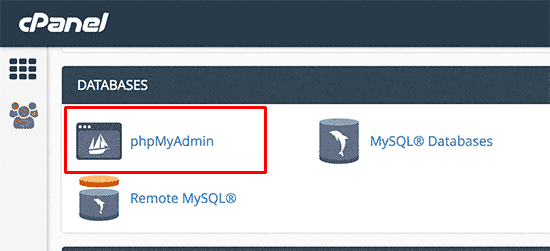
প্রথমে আপনার হোস্টিং সিপ্যানেলে লগইন করুন এবং Database সেকশন থেকে phpMyAdmin এ যান।

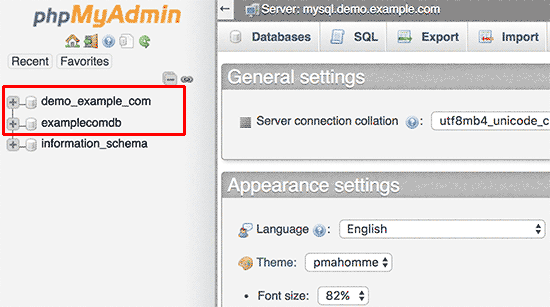
এবার আপনি আপনার সাইটের ডাটাবেইজে ক্লিক করুন ডাটাবেইজ মেনু থেকে। বুঝতে না পারলে নিচের স্ক্রিনশট দেখুন।


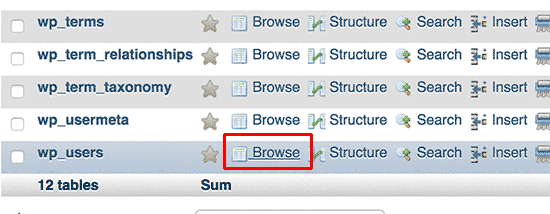
এবার নিচের স্ক্রিনশটের মতো একটি লিস্ট আসবে সেখান থেকে wpso_user নামপর অপশনে ক্লিক করুন।


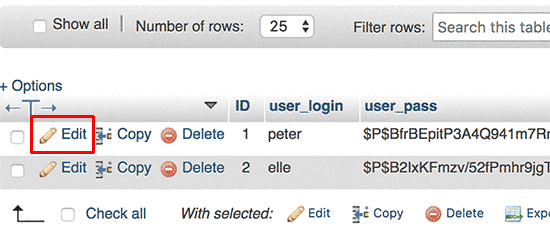
এবার এডিটে ক্লিক করুন যেভাবে নিচের স্ক্রিনশটে দেখানো হয়েছে সেভাবে।

এবার আপনি নতুন যে পাসওয়ার্ড সেট করতে চাচ্ছেন সেটি লিখুন user_pass এর ডান পাশের বক্সে এবং এর বামের ড্রপ ডাউন থেকে MD5 সিলেক্ট করুন। অতঃপর ক্লিক করুন Go তে।


ব্যাস হয়ে গেলো আপনার ভুলে যাওয়া পাসওয়ার্ড রিসেট। আশা করি সবাই বুঝতে পেরেছেন। আর যদি না বুঝতে পারেন তাহলে অবশ্যই কমেন্ট করবেন। সমাধানের চেষ্টা করবো।


নোটঃ পোস্টটি HosterPlan Blog থেকে অনুকৃত।

Labels:

Tuesday, February 18, 2020

[mod themes]নিয়ে নিন অসাধারণ একটি মোড করা থিম।

[mod themes]নিয়ে নিন অসাধারণ একটি মোড করা থিম।

আসসালামু আলাইকুম।


এই প্রথম আপনাদের জন্য
একটি ওয়াডপ্রেস থিম শেয়ার করতে যাচ্ছি।এই রকম থিম এর আগে ট্রিকবিডিতে কেউ শেয়ার করেনি। আশা করি আপনাদের থিম টি ভালো লাগবে । আর থিমটা যদি
আপনাদের যদি ভালো না লাগে দয়া করে খারাপ কমেন্ট করবেন না। চলুন তাহলে পোস্ট টা শুরু করা যাক।

প্রথমে থেমটার কিছু স্কিনর্সট দেখে নিন:


তো কেমন লাগলো থিমটা
।যদি ভালো লাগে তাহলে থিমটা ডাউনলোড করে নিন।নিচে থিমটার কিছু তথ্য দিলাম

*Theme
Information


* Mobile Friendly
* Seo Friendly
* Live Notification

Labels:

৬৯ $ মূল্যর হোস্টিং থিম নিয়ে নিন ফ্রিতে( Hosted WordPress Hosting theme)

৬৯ $ মূল্যর হোস্টিং থিম নিয়ে নিন ফ্রিতে( Hosted WordPress Hosting theme)

প্রথমেই আপনাকে অভিন্দন জানাই, যে আপনার স্বপ্ন ধরুন পুরন প্রায় হয়ে গেছে।
আপনি যদি কোনো কিছু করতে চান, তাহলে মনে সাহস রাখবেন, কথায় আছে না মনের শক্তিই বড় শক্তি।
সবকিছুকে সুন্দর দৃ‌ষ্টিতে দেখবেন তাহলে সবকিছুই করা সম্ভব।
এই কথা গুলো শোনানোর অর্থ হলো এই যে, অনেকেই মনে করে যে হোস্টিং সাইট বানাবো টাকা পাবো কোথায় ?ক্লায়েন্ট পাবো কোথায় ?
আমি কি নিয়ন্ত্রণ করতে পারবো?
সবকিছু ভালোভাবে পারবো তো?
নিজের মনের মধ্যেই যদি এই ধরনের, ঘুরপাক খেতে থাকে তাহলে, ওই কাজে আপনি অসফল হবেন ই, সফল হওয়ার কোনো চান্স নেই।
আপনার মন যদি শক্ত হয় যে, রাস্তায় চলা শুরু করি রাস্তাই পথ দেখাবে, এরকম এটিটুড থাকলে শুরু করতে পারেন যেকোনো কাজ, তা হোক হোস্টিং কিংবা ব্লগিং, কিংবা ইকমার্স।
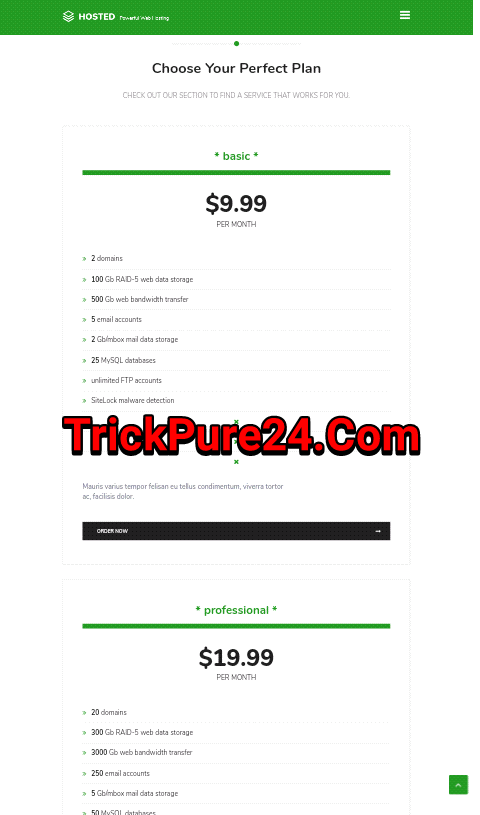
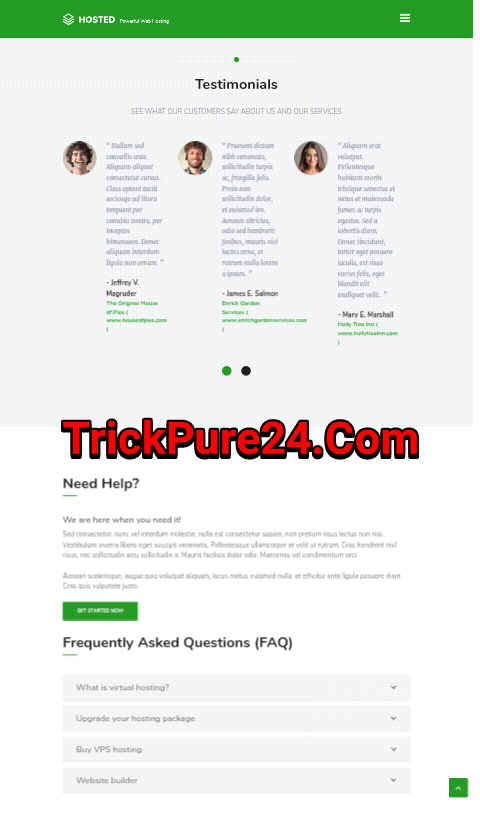
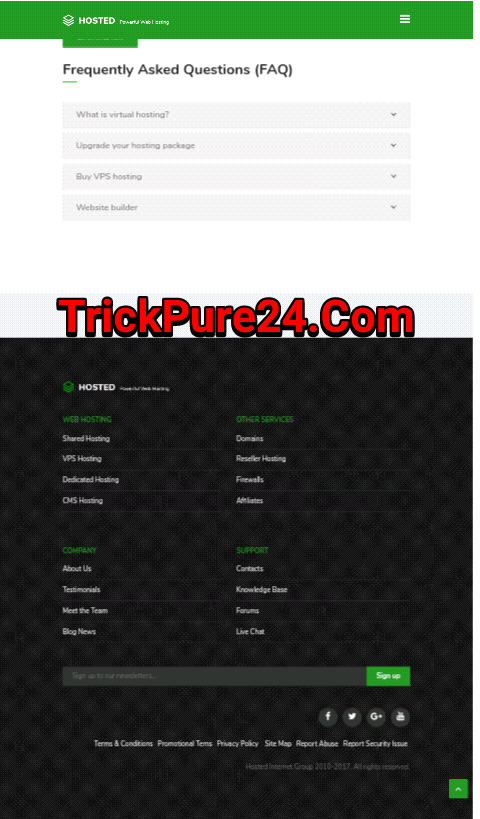
থিমটি অনেক সুন্দর একটি থিম, কিছু স্কিনসট দেখুন

সরাসরি ডেমো দেখুন Hosted Hosting theme
ডাউনলোড করুনHosted Hosting theme
আমার ছোট একটি ওয়েবসাইট, সময় পেলে ঘুরে আসবেন TrickPure24.Com


Labels: