What is Virtual RAM ?, How does it work ??
RAM is an important thing that is present in every smartphone and most people know it. However, virtual ram or extended ram is a relatively new feature (in the case of smartphones).
Virtual RAM, dynamic RAM expansion, extended RAM are all the same thing, the work is also just the names according to different bands. Today I will try to explain.
Vivo was the first to introduce this feature in their vivo x60 series phones. Then gradually bands like realme, xiaomi, oppo, onePlus, iQOO etc. started using the same feature under different names.
What is Virtual RAM?
To understand the concept of virtual RAM, we must first understand what is RAM? How does it work ??
What is Ram ??
The full form of ram is Random Access Memory (ram). RAM is usually attached to the motherboard, it is temporary memory.
How does Ram work ??
When we turn off or power off the mobile, the RAM is finished, and all the information contained in it is deleted. Let me give you an example: Suppose you give a command to a mobile, touch to open a game or application, that command will go to the CPU (processor) and the CPU will give that instruction to Ram. Now Ram will run the application or game from storage (internal memory / hard disk) then your game or application will open. (Apps data is stored in storage).
When you install an app or game on mobile or computer, it loads on the internal memory / hard disk but runs ram.
If there is more ram then
you can open more apps or games, and if there is less then the phone will slow down or hang. Now you must understand why mobile or PC is slow anyway.
The bottom line is CPU. CPU can be called the brain of computer / smartphone. RAM works just like your instructions, but you can't direct Direct RAM, CPU: When RAM is needed then it instructs RAM. RAM of your smartphone is a helpless memory which is faster than any other type of storage. When you open an application on the phone, RAM will start working. RAM allows fast app loading without any delay. Anyway.
What is Virtual RAM?
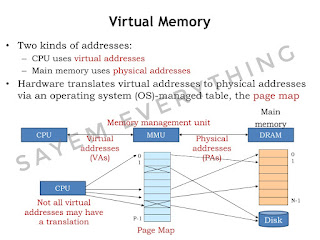
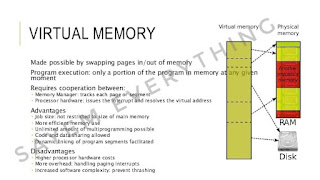
Virtual RAM actually uses the phone's internal storage (internal memory) as temporary RAM 一 known as virtual RAM.
Simply put, virtual RAM is a technology where a portion of your phone's internal memory is used as additional RAM, which effectively increases the total amount of RAM in your smartphone.
For example, if a phone has 6GB RAM and 128GB storage and if you increase the virtual RAM to 5GB, you will now have 11GB RAM and 5GB less storage and 123GB.

How does it work ???
This feature is often used on PCs and it is actually a feature of PCs that was later introduced for smartphones. Although a few years ago, virtual ram could be used on smartphones through root access. But now the official feature is in the smartphone. It's much easier now. You don't have to root your phone like you used to. The amount of virtual RAM you can increase depends on the device and currently 1GB to 7GB of virtual RAM can be used.
To use Virtual RAM, you need to turn on the feature and reboot / restart the phone.
Does Virtual RAM Really Work ??
When using virtual RAM you will not see any change in the performance of virtual RAM and main RAM used by the system from storage, your RAM performance will remain the same. Let us give another example to understand the concept of how virtual RAM works.
Suppose, you have 10 apps on your Android smartphone and there is no more space in the 4 gb RAM of the phone, so it will close the android apps which are not running in the background or not running in the background.
This is where virtual RAM comes in handy. Virtual RAM handles apps that have no activity in the background and will keep such apps in RAM for a long time. The Android system will maintain which apps need to be stored in virtual memory and which should not.
Labels: Windows PC




 কাজে লাগলে একটি লাইক ও একটি Comment করিয়েন।


 Access Clipboard History



 New Cookies Link:-
  Process